AI SEO automation
ClickRank Review: Features, Pricing And Verdict
ClickRank automates on-page SEO fixes using your Google Search Console data. This review covers what it does, what it costs and who it suits, from the official site.
Visit ClickRankRead The Review
Affiliate link: opens the official website. See the disclosure below.
What Is ClickRank
ClickRank (clickrank.ai) is an AI SEO automation tool powered by Google Search Console data. You connect Search Console in one click and add a JavaScript snippet to your site header, and it optimizes on-page elements such as title tags, meta descriptions, image alt text, schema markup and internal links. It also aims at visibility in AI search such as Google AI Mode, Gemini, ChatGPT and Claude. The site shows 4.9 out of 5 ratings on G2 and Trustpilot, which are the vendor's figures.
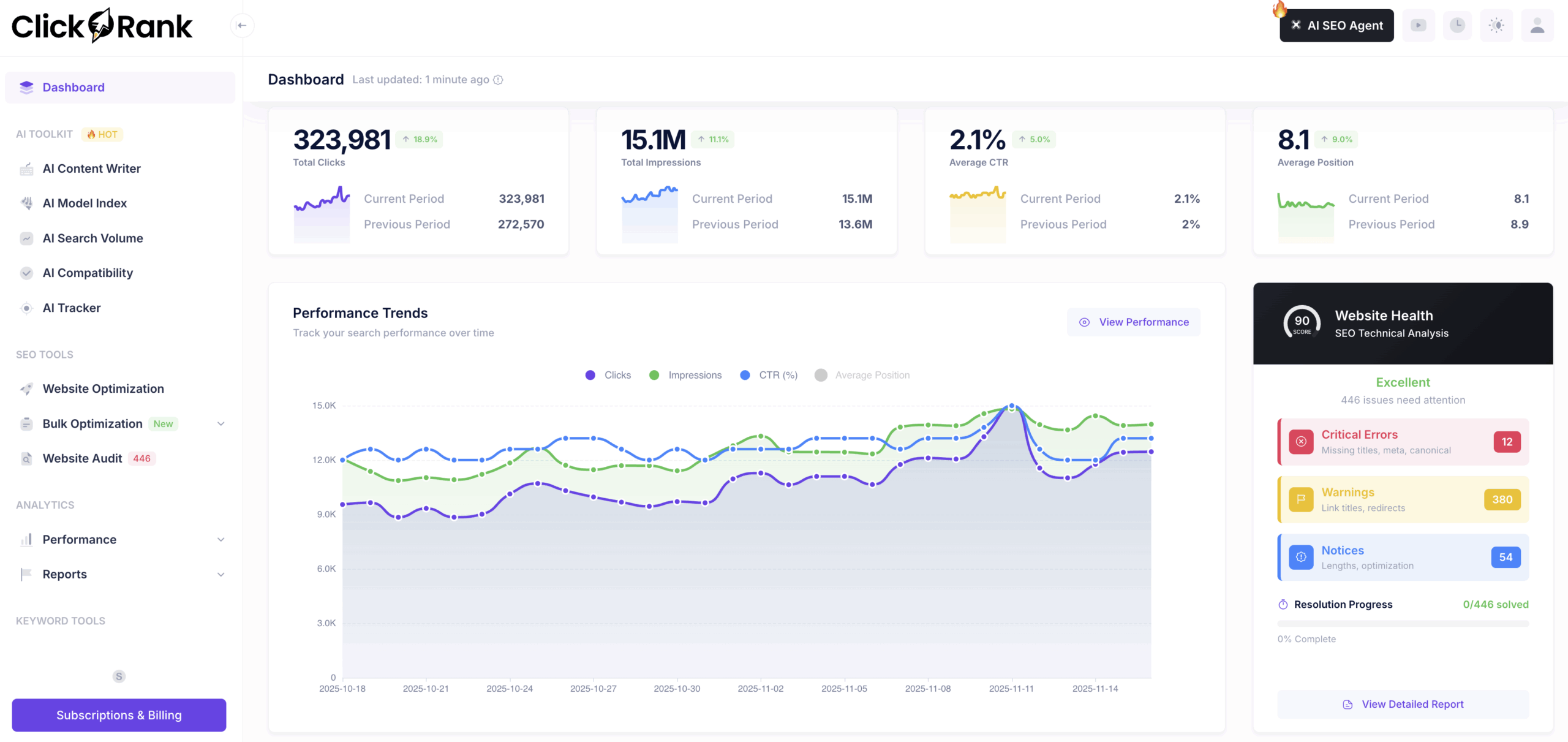
ClickRank Key Features
- Titles and meta descriptions: automatic optimization aimed at higher CTR
- Image alt text generated with an AI vision model
- Schema markup in one click
- Internal links with AI-written anchor text
- Content optimization for keywords, readability and intent
- AI search tools: AI Overview Tracker and AI model checks
- Reports and analytics to watch the results
More on the features page.
ClickRank Pricing And Plans
| Plan | Monthly | Yearly | Websites | Team members | Crawled pages | Crawl interval | Support |
|---|---|---|---|---|---|---|---|
| Solo | $59 | $590 | 1 | 1 | 2,000 | Monthly | Priority email |
| Business | $79 | $790 | 3 | 3 | 10,000 | Bi-weekly | Priority chat |
| Agency | $399 | $3,990 | 10 | 10 | 60,000 on the plan card (30,000 in the comparison table) | Weekly | Priority phone |
See the pricing page and the discount page.
Prices are as shown on the official pricing page on 24 October 2026. Plans and prices change, so check the live page.
ClickRank Pros And Cons
Pros
- Automates repetitive on-page fixes
- Unlimited optimizations on every plan
- One-click Search Console connection and a header snippet
- 7-day money-back guarantee
- Yearly billing costs 10 months instead of 12
Cons
- No free trial
- Page crawl caps: 2,000 pages on Solo
- Agency crawl limit is shown as both 60,000 and 30,000
- Each website can be on one account only
- Ranking claims have no supporting data on the page
Is ClickRank Worth It: Our Verdict
We have not used ClickRank, so this verdict comes from the official pages and not from our own tests.
Who Should Use ClickRank And Who Skip
A good fit
- Site owners with many pages that need titles and descriptions
- Agencies managing several client sites
- Teams that want to track AI Overview visibility
Think twice
- Anyone who wants a free trial first
- Sites that need strict manual control of every tag
- Very large sites that would exceed the crawl caps
Is ClickRank Legit And Safe
The site publishes support contact details (support@clickrank.ai), a refund policy and billing controls, and says it does not store your Google Search Console data on its servers. We cannot verify these claims or the results. The tool changes what your site shows, so test on a few pages and keep a record of the originals before you roll it out widely.
What We Could Not Verify
- Traffic and ranking gains: the page offers no supporting data.
- The Agency crawl limit, which differs between the plan card and the table.
- How the WordPress plugin page fits with the "no plugins" claim.
- User reviews: we did not collect or quote any.
How To Get Started With ClickRank
- Open the official site and choose a plan, monthly to start.
- Connect Google Search Console.
- Add the JavaScript snippet to your site header.
- Review the suggested changes on a few pages first.
ClickRank Review FAQ
Does ClickRank have a free trial?
The pricing page shows none, but it lists a 7-day money-back guarantee. See the free trial page.
Is there a coupon code?
We did not find one. See the discount page.
What happens if I cancel?
Optimizations stay active while the code stays on your site, per the pricing FAQ.
How much is ClickRank?
$59, $79 or $399 a month, or $590, $790 or $3,990 a year.
How We Wrote This
This page is based on the official ClickRank website and its pricing page, read on 24 October 2026. We have not tested ClickRank ourselves, so we do not claim results. Quality, speed and capability claims are the vendor's own claims. Prices, models and promotions change often, so confirm them on the official site before you pay. See how we review.