AI reading assistant for documents and books
MyReader AI Review: Features, Pricing And Verdict
MyReader AI (myreader.ai) lets you upload books, papers and documents, ask questions across them and get answers with the page they came from, and listen to them as audio. This review covers what it does, the plans and who it suits, from the official pages.
Try MyReader AI FreeRead The Review
Affiliate link: opens the official website. See the disclosure below.
What Is MyReader AI
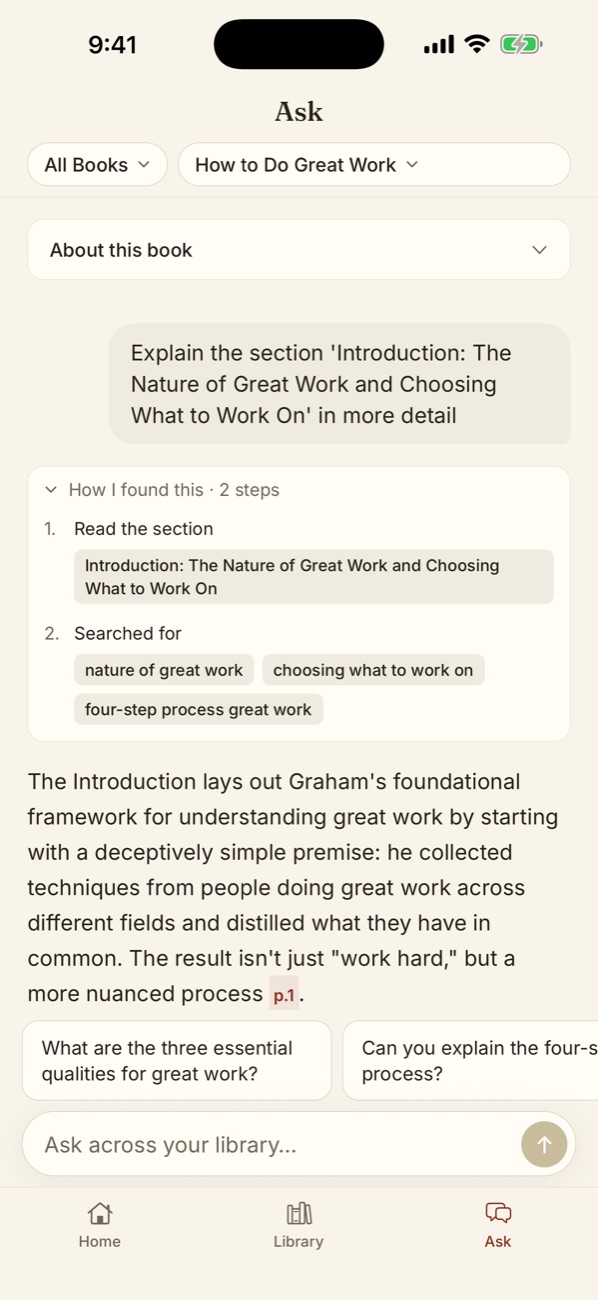
MyReader AI describes itself as an AI reading assistant. You upload PDFs, EPUB, Word and PowerPoint files, web articles or YouTube links, chat with one document, a collection or your whole library, and each answer comes with in-line citations that jump to the exact page. It can also turn text into audio in 50+ voices and 30+ languages, according to the site, and there is an iPhone app. It is run by Myreader Inc.
MyReader AI Key Features
- Chat with your library across one book, a collection or everything
- Smart citations that open the page with the answer
- Text to speech in 50+ voices and 30+ languages, per the site
- Universal documents: PDF, EPUB, Word, PowerPoint, links and YouTube
- OCR and bulk upload listed on every plan
- Private library that is not shared between users
More on the features page.
MyReader AI Pricing And Plans
There are three plans: Free, Lite and Pro. Lite is $10 per month, or $7.50 per month on annual billing, and Pro is $20 per month, or $15 per month on annual billing.
| Plan | Monthly billing | Annual billing (per month) | Questions | Pages | File size | Audiobook hours |
|---|---|---|---|---|---|---|
| Free | $0 | $0 | 5 per day | 200 total | 10 MB | Listed, no cap shown |
| Lite | $10 | $7.50 | 250 per month | 5,000 per month | 250 MB | 10 hrs |
| Pro | $20 | $15 | 1,000 per month | 15,000 per month | No limit | 30 hrs |
See the pricing page and the discount page.
Prices were read from the official pricing page on 28 October 2026 by switching between the Annual and Monthly toggle. The page shows annual prices as a per-month figure and says "Save 25% on annual plans. Cancel anytime." It does not say on the page how the annual amount is charged, so confirm the total at checkout. Prices can change.
MyReader AI Pros And Cons
Pros
- Free plan with no card mentioned on the site
- Answers cite the page they came from
- Works with several file types and links
- Audio listening and an iPhone app
- Cancel anytime, per the site
Cons
- Free plan allows only 5 questions a day and 200 pages
- Refunds only in exceptional cases
- Terms last updated in April 2024
- Usage figures are vendor claims
- AI answers still need checking
Is MyReader AI Worth It: Our Verdict
We have not used MyReader AI, so this verdict comes from the official pages and not from our own tests.
Who Should Use MyReader AI And Who Skip
A good fit
- Students working through textbooks and lecture notes
- Researchers reading many papers
- Professionals who need answers from long reports
Think twice
- Anyone who needs guaranteed accuracy without checking
- People who want a refund if the tool does not suit them
- Users with files they do not have the right to upload
Is MyReader AI Legit And Safe
The site shows a company name (Myreader Inc.), terms, a privacy policy, a contact email, an App Store listing and an affiliate program. It says your documents are private, are not shared between users and can be deleted anytime. We cannot verify the 100,000+ user claim or the testimonials.
What We Could Not Verify
- The 100,000+ students and professionals claim.
- The dated testimonials on the home page.
- The 50+ voices and 30+ languages for audio.
- How annual billing is charged.
How To Get Started With MyReader AI
- Open the site and start on the Free plan.
- Upload one document you know well and ask questions you can check.
- Open the cited pages to see if the answers hold up.
- Upgrade only if the Free limits block you.
MyReader AI Review FAQ
Is there a free plan?
Yes. See the free trial page.
Is there a coupon code?
We found none. The site shows 25% off annual plans. See the discount page.
Can I get a refund?
Only in exceptional circumstances, with requests within 14 days, per the Terms.
Can I cancel?
Yes, anytime, and it takes effect at the end of the billing period.
How We Wrote This
This page is based on the official MyReader AI website and its pricing page, read on 28 October 2026. We have not tested MyReader AI ourselves, so we do not claim results. Quality, speed and capability claims are the vendor's own claims. Prices, models and promotions change often, so confirm them on the official site before you pay. See how we review.