AI keyword and metadata tool
PhotoTag.ai Features
PhotoTag.ai turns a folder of photos or videos into titles, descriptions and keywords. This page lists the features shown on the official site and the limits that apply.
See PhotoTag.ai FeaturesRead The Features
Affiliate link: opens the official website. See the disclosure below.
Feature Overview
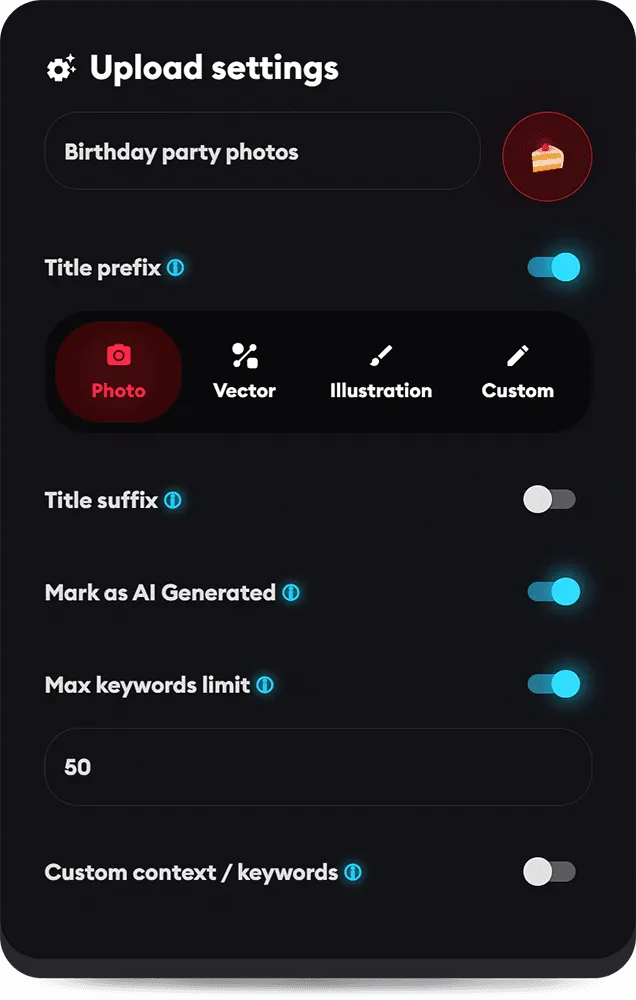
Upload Settings
Before an upload you can set a maximum keyword count, the output language, custom context or keywords, the maximum title and description length, and a title prefix or suffix. The panel also has a switch to mark files as AI generated, and the AI can use the existing metadata for context.
Files And Export
Images: PNG, JPEG, WEBP, SVG and TIFF. Videos: MP4, MOV and AVI, with one credit per video whatever its length. You can export the files with IPTC, XMP, EXIF or QuickTime metadata, or export a CSV for stock platforms such as Shutterstock, Adobe Stock, iStock, Getty Images, Pond5, Envato, Freepik, Dreamstime, Canva and others on the FAQ list.
Plug-In, API And Limits
A Lightroom Classic plug-in and an API are available. Batch size and file size grow with the pack you buy.
| Pack | Price now (USD) | Crossed-out price | Per upload | Batch size | Max photo / video |
|---|---|---|---|---|---|
| 2,000 credits | $18 | $36 | $0.0090 | 500 files | 40MB / 500MB |
| 10,000 credits | $59 | $118 | $0.0059 | 1,000 files | 70MB / 1GB |
| 50,000 credits | $190 | $380 | $0.0038 | 1,500 files | 100MB / 2GB |
Prices were read from the official pricing page on 29 October 2026. They are one-time payments in US dollars with no subscription, and the page shows a higher crossed-out price next to each pack without saying how long the lower price lasts. The site does not say if tax is included. Check the live price before you pay.
Safe Use
The AI drafts titles, descriptions and keywords, and the site itself says to review the results before publishing. Check each result by hand, because AI tags can be wrong, and read the rules of each stock agency for AI-assisted metadata before you upload. Files are used only for the tagging, and the FAQ says a low-resolution copy is kept until you delete the album or it is two years old. We have not used PhotoTag.ai and have not checked these claims.
PhotoTag.ai Features FAQ
Can I edit the results?
Yes, you can edit titles, descriptions and keywords, or regenerate them.
Does it support vector files?
Yes, SVG.
Where are the prices?
On the pricing page.
How We Wrote This
This page is based on the official PhotoTag.ai website, pricing page, FAQ and refund policy, read on 29 October 2026. We have not tested PhotoTag.ai ourselves, so we do not claim results. Quality, speed and capability claims are the vendor's own claims. Prices, models and promotions change often, so confirm them on the official site before you pay. See how we review.